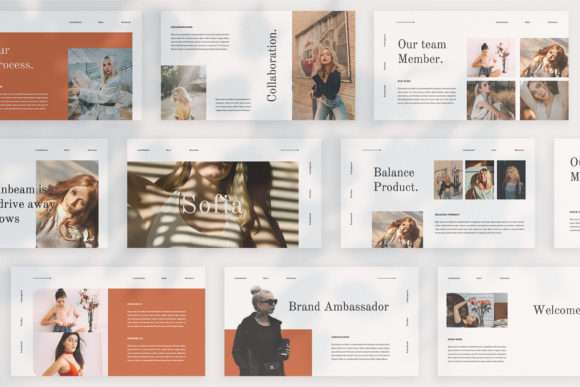
SOFIA - Google Slide Template: Beyond the Default Layout
A Presentation Template Designed for Real Impact
If you’ve ever sat through a presentation where every slide looked exactly the same—same bullet points, same margins, same tired placeholder—you know how quickly an audience tunes out. The SOFIA - Google Slide Template takes a different approach. Each slide is its own composition, not just a recycled layout with swapped-out text. This matters more than most people realize. When your visuals stay fresh from one slide to the next, your audience stays with you.
SOFIA works particularly well for digital media professionals, marketers, and anyone building a presentation that needs to feel polished without being generic. The template carries a lookbook and magazine style layout philosophy, which means it borrows from editorial design principles—strong visual hierarchy, intentional whitespace, and typography that earns its place on the slide. It’s the kind of design asset that makes you look like you hired a professional, even if you assembled everything yourself on a Tuesday night.
What Makes Each Slide Feel Intentional
Most presentation templates give you one or two layouts and ask you to stretch them across thirty slides. SOFIA doesn’t do that. The variety of layout and text arrangements means you can match the structure of each slide to the content it carries. A data-heavy slide gets a different treatment than a brand story slide, which gets a different treatment than a team introduction. This isn’t just aesthetic preference—it’s how you maintain audience engagement across a longer presentation.
The template comes in PPTX format at full HD resolution (1920x1080 pixels), so it looks sharp on projectors, monitors, and shared screens alike. The unique theme colour system with automatic color change is a practical feature that saves real time. You set your brand palette once, and the entire deck updates. No more manually recoloring shapes on forty-seven slides. For entrepreneurs and small business owners managing their own brand identity, this kind of built-in consistency is genuinely useful.
Slide Master Architecture and the Drag-and-Drop Workflow
One of the more technical strengths of SOFIA is that it’s built with Slide Master. If you’ve never used Slide Master before, it essentially means the template’s structural elements—backgrounds, recurring design components, image frames—are controlled from a central editing layer. You drag and drop your image into a placeholder, and the layout handles the rest. This is where the template earns its reputation as easy to customize and fully editable.
The picture placeholder system deserves attention. Rather than asking you to manually resize and crop images to fit awkward boxes, SOFIA’s placeholders are shaped to work with the surrounding design. Drop in a landscape photo from Unsplash or Pexels, and it sits naturally within the composition. This is a small detail that separates a premium font and template experience from a free download that looks free.
The free font pairing included with the template is documented in a Help & Instruction PDF, so you’re not left guessing what typeface was used or where to find it. For designers and content creators who care about modern typography, knowing exactly which serif font or sans serif font is at work—and having the license to use it—removes a common friction point.
Where SOFIA Fits Across Different Projects
Think about the last pitch deck you built. Or the client proposal. Or the workshop you led. The visual tone of your presentation signals professionalism before you say a word. SOFIA’s magazine style layout works especially well for branding presentations, marketing strategy decks, creative portfolios, and product launches. The editorial design sensibility gives your content a sense of authority without feeling corporate or stiff.
For bloggers and publishers, the template bridges the gap between written content and visual storytelling. A content strategy presentation doesn’t have to look like a corporate memo. With SOFIA’s varied layouts, you can present editorial calendars, audience data, and brand partnerships in a way that feels cohesive with your actual publication’s visual identity.
Small business owners often underestimate how much a well-designed presentation influences a potential client or business partner. You might have the best proposal in the room, but if your slides look like an afterthought, you’re fighting an uphill battle. SOFIA gives you design assets that communicate care and competence—two things that matter when someone is deciding whether to trust you with their budget.
Practical Guidance for Working with the Template
Before you commit to any presentation template, including SOFIA, run through a quick evaluation. Open the file and click through every single slide. Does the variety of layouts actually match the kind of content you present? A template with fifty unique slides means nothing if thirty of them are layouts you’ll never use. SOFIA’s strength is that its variations feel purposeful rather than padded.
Test your brand colors against the automatic color change feature. Some templates handle color transitions poorly, leaving certain elements in awkward default shades. Apply your palette early and check each slide for visual consistency. This is also the moment to evaluate the font pairing. The included typeface may work beautifully on its own, but consider whether you need a secondary font for captions, data labels, or speaker notes. A strong font pairing—one display font for headlines and one clean sans serif for body text—usually gives you the best readability across different screen sizes.
Keep in mind that all photographs shown in the template preview are not included. This is standard for presentation templates, but it’s worth planning for. Curate your images before you start editing. Pull a set of consistent, high-quality photos from Unsplash or Pexels that share a similar color temperature and lighting style. Dropping mismatched stock photos into a beautifully designed template undermines the entire visual hierarchy the template was built to support.
Making It Work for Your Audience
The best presentation template is one that disappears into your message. SOFIA’s design is strong enough to hold attention but restrained enough that it doesn’t compete with what you’re actually saying. That balance—between visual interest and content clarity—is what separates a template that looks good in a preview from one that actually works in a boardroom, a Zoom call, or a conference stage.
Whether you’re presenting to a client, pitching a business partner, or leading a workshop, the goal is the same: you want your audience focused on your ideas, not distracted by inconsistent slides or amateur formatting. SOFIA gives you a foundation that handles the visual side of that equation, so you can focus on the substance of what you’re presenting. Good luck with your next presentation.