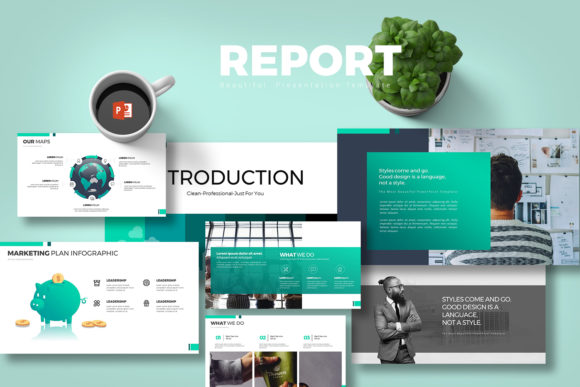
Report PowerPoint Presentation: A Complete Toolkit for Your Business
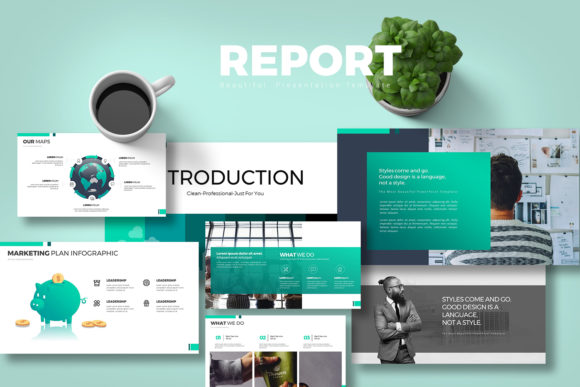
When you have a brilliant idea or a quarterly review to deliver, the last thing you want is to spend three days wrestling with formatting issues. We have all been there—staring at a blank slide, trying to align text boxes, or searching for that one specific icon that fits the corporate style. The Report PowerPoint Presentation is designed specifically to solve that friction. It is not just a collection of slides; it is a comprehensive visual system built for multipurpose use, whether you are crafting a high-stakes financial pitch, a creative agency overview, or a personal project summary. The visual personality of this template strikes a balance between clean minimalism and professional authority. It avoids the "clip art" look of older presentations, utilizing a modern typography approach and ample white space to let your content breathe.
One of the standout features of this asset is its sheer volume and flexibility. With 10 distinct PPTX files and a total of 400 slides, you are equipped to handle almost any scenario. The kit includes 40 unique slides per color scheme, ensuring you are not just duplicating the same layout over and over. Visual hierarchy is key in any presentation, and this template handles it well through a 16:9 aspect ratio that looks native on modern widescreen monitors and projectors. The aesthetic relies on strong grid systems, which is essential for editorial design within a slide deck. It allows the eye to travel naturally from the headline to the key data points without confusion.
Customization Without the Headache
A common pain point with premium templates is the requirement for external software. Many "premium font" bundles or complex vector templates force you to own Adobe Illustrator or Photoshop to make basic changes. The Report PowerPoint Presentation eliminates this barrier entirely. It is fully editable within PowerPoint itself. Every element, from the shapes to the colors, can be manipulated directly. This is a massive advantage for small business owners or marketers who need to update a slide deck quickly before a meeting but do not have a design team on standby.
The inclusion of vector icons directly in the files is a game-changer for brand identity consistency. Instead of hunting for external icon packs that might clash in style or line weight, you have a curated set of graphics ready to go. These icons scale infinitely without losing quality, maintaining that crisp, professional look whether you are projecting on a large screen or viewing on a laptop. Furthermore, the fully editable charts are a lifesaver for anyone presenting data. Because they are linked to Excel, you can input your raw numbers, and the graphics update automatically. This ensures your finance reports or sales data are always accurate and visually represented without manual resizing of bars or pie slices.
Visual Style and Versatility
The template comes with 5 color schemes on both white and dark background versions. This duality is crucial for modern web design and presentation trends. The dark mode options, for instance, are excellent for creative pitches or evening presentations where a bright white screen can be blinding. The light modes are standard for corporate environments but are styled with enough contrast to avoid looking washed out. This versatility makes it a strong candidate for social media graphics as well; you can easily screenshot a slide, crop it, and use it as a cohesive Instagram story or LinkedIn post that matches your presentation materials.
While this is a PowerPoint file, the design principles it embodies are rooted in graphic design fundamentals. The layouts utilize a mix of serif and sans serif font styling (depending on your font choice, though the guide suggests specific free fonts to maintain the intended look). This interplay between font types helps create a visual rhythm that keeps the audience engaged. It is an ideal tool for packaging design mockups or logo design presentations because the neutral backgrounds ensure your creative work remains the hero of the slide. It provides a professional stage for your portfolio.
Practical Application and Workflow
For the entrepreneur or content creator, time is money. The workflow provided by the Report PowerPoint Presentation is streamlined for efficiency. The image placeholder functionality means you do not need to manually resize photos to fit specific frames. You simply drag and drop your image into the designated area, and the template handles the cropping and masking. This is particularly useful for editorial design workflows where you are swapping out high-resolution product shots or team photos frequently.
It is important to note the licensing and usage details provided. The template utilizes free fonts, which is a significant benefit for commercial use. Often, premium fonts included in templates require separate licenses for commercial distribution, which can complicate things for a small business owner. By using free, accessible typefaces, the creators of this kit have ensured that your brand identity can be replicated consistently by anyone on your team without legal hurdles or extra costs. However, always remember to install the fonts on your machine before opening the file to avoid the dreaded "missing font" error that can scramble your layout.
Stock photos are not included, which is actually a best practice in professional templates. Stock imagery is highly subjective to the specific industry you are in. A generic "team meeting" photo might work for a consultant but looks out of place for a craft or hobbyist business. By leaving the imagery open, the template allows you to inject your own authentic visual style. Whether you are a blogger sharing personal stories or a publisher releasing a digital report, your unique photography or illustrations will integrate seamlessly with the structured layout of the slides.
In summary, the Report PowerPoint Presentation is a robust tool for anyone who values professionalism and efficiency. It bridges the gap between basic, uninspired templates and expensive, custom-designed decks. It supports a wide range of applications—from creative pitches to rigid finance reports—by offering a flexible, editable, and visually consistent foundation. If you are looking to elevate your visual communication without learning new software, this collection of slides, icons, and charts offers a practical solution that respects both your time and your budget.