Master Your Business Narrative with Report Google Slides
In the fast-paced world of business, whether you are pitching to investors, presenting quarterly earnings, or outlining a marketing strategy, the delivery mechanism is just as critical as the data itself. We have all sat through presentations where the content was buried under chaotic layouts, mismatched fonts, and generic clip art. This is where the Report Google Slides template steps in, offering a sophisticated solution for the modern professional. It is designed not just to hold your information, but to amplify it with a level of visual clarity that commands attention.
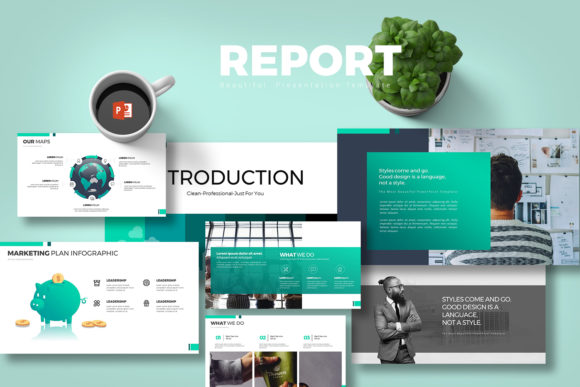
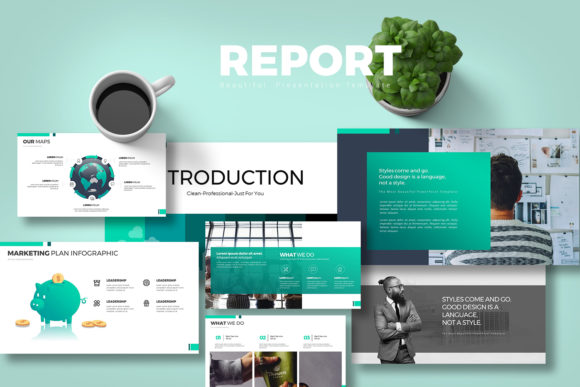
At its core, this template is built for the entrepreneur, the creative agency, and the corporate strategist who values efficiency without sacrificing style. The visual personality of Report Google Slides leans heavily into a modern, minimalist aesthetic. It avoids the clutter often found in standard templates, opting instead for clean lines, ample white space, and a structured grid system. This approach ensures that your audience focuses on the narrative you are weaving, rather than struggling to decipher the slide layout. The design feels professional and trustworthy, making it an ideal choice for serious business contexts where credibility is paramount.
Visual Design and Aesthetic Appeal
The defining characteristic of this template is its dual-natured versatility. It comes in two distinct versions: a crisp, high-contrast white background and a sleek, sophisticated dark background. This allows you to tailor the mood of your presentation to your specific brand identity or the lighting environment of your speaking venue. The white version offers a sense of openness and clarity, perfect for data-heavy reports where readability is key. Conversely, the dark version exudes confidence and drama, making it an excellent choice for creative pitches or evening events.
One of the standout features is the inclusion of vector icons. Unlike rasterized images that pixelate when scaled, these vectors maintain their sharpness regardless of size. This is crucial for maintaining a professional standard, especially when displayed on high-resolution projectors or large screens. The template provides 80 total slides, split between 40 unique layouts. This volume ensures that you are not recycling the same three slide designs throughout your deck. Instead, you have a rich library of layouts ranging from full-bleed imagery to complex data visualization charts.
Unmatched Editability and User Experience
A common pain point with premium templates is the reliance on third-party software like Adobe Illustrator or Photoshop to make basic changes. Report Google Slides eliminates this friction entirely. The "All Element Are Editable" feature is not just a marketing tagline; it is a functional reality. You can change the color of a single shape, adjust the thickness of a line, or swap out a font directly within Google Slides or PowerPoint. This empowers small business owners and bloggers who may not have a dedicated design team to make real-time adjustments during a meeting or brainstorming session.
The template is optimized for a 16:9 aspect ratio, which is the modern standard for widescreen displays. This format utilizes the full width of the screen, providing a cinematic feel that is more immersive than the older 4:3 format. Furthermore, the inclusion of editable charts is a game-changer for financial presentations. Instead of static images, you can input your own data, allowing for dynamic updates as your numbers change. This is particularly valuable for finance professionals who need to present accurate, up-to-the-minute figures.
Practical Applications and Versatility
While the name suggests a focus on "reports," the utility of this asset extends far beyond quarterly reviews. For marketing professionals, these slides serve as a robust framework for campaign retrospectives and strategy proposals. The clean typography and structured layouts help in creating a visual hierarchy that guides the viewer's eye from the main headline to the supporting details. This is essential for brand identity work, where consistency and clarity reinforce the brand message.
For content creators and designers, the template acts as a canvas for creative storytelling. The image placeholders are designed to accommodate high-quality stock photos or custom graphics, transforming a standard deck into a visual portfolio. Imagine a web designer using the dark background version to showcase a new UI design; the dark frames make the colors of the website mockups pop, creating a striking visual contrast.
Optimizing Your Workflow
To get the most out of Report Google Slides, consider the following practical tips. First, take advantage of the color scheme provided. The template comes with a pre-defined palette that ensures color harmony. However, if your brand has specific hex codes, you can easily apply them to the shapes and text to create a custom font pairing experience. Speaking of fonts, the template utilizes free fonts, which is a significant cost-saver for startups. The documentation file included in the package provides the necessary links to download these typefaces, ensuring your typography matches the preview exactly.
When preparing your content, utilize the diverse slide layouts to break up text. A common mistake in editorial design and presentation creation is cramming too much text onto a single slide. Use the "agenda" or "chapter" slides to create breathing room. Use the infographic elements to visualize complex data points. This not only makes the presentation more digestible but also more engaging for your audience.
Conclusion: A Professional Asset
In summary, Report Google Slides is more than just a collection of slides; it is a comprehensive design asset tailored for the multipurpose demands of modern business. It bridges the gap between high-end graphic design and accessible, user-friendly software. Whether you are a freelancer pitching a new client, a publisher outlining a new series, or a corporate manager summarizing annual performance, this template provides the professional polish required to succeed. By combining aesthetic appeal with deep functionality, it ensures that your message is not only heard but remembered.