Corporas: A Modern Keynote Template for Corporate Presentations
Visual Character and Professional Appeal
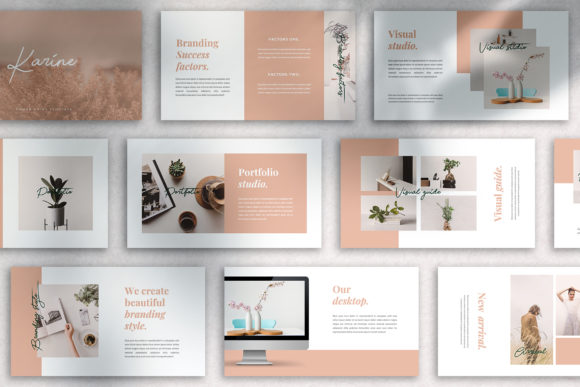
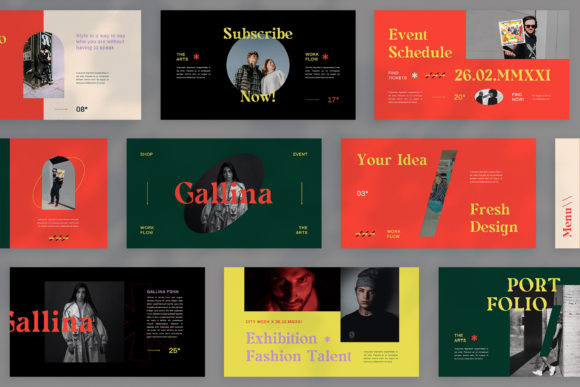
The Corporas – Corporate Keynote Template presents a clean, structured visual language designed for clarity and impact. Its aesthetic leans towards modern minimalism, utilizing ample white space and a restrained color palette to direct focus onto your content. The personality is confident, professional, and trustworthy—qualities essential for corporate communication. The overall style avoids unnecessary ornamentation, favoring sharp lines, balanced layouts, and a sophisticated typographic hierarchy. This design approach ensures that your message, whether financial data, a project roadmap, or a brand story, is presented with authority and visual coherence. The template’s appeal lies in its ability to make complex information appear organized and accessible, establishing immediate credibility with your audience.
Optimal Applications for Business and Creative Projects
This presentation template excels across a spectrum of professional scenarios. For corporate and business use, it’s ideal for company profiles, quarterly reviews, investor pitch decks, and internal strategy sessions. Its structured slides provide a reliable framework for presenting data, timelines, and organizational charts. Beyond the boardroom, creative agencies and photographers can leverage its clean grid system for portfolio showcases, ensuring the work itself remains the hero. The drag-and-drop picture placeholders and easily editable graphics make it practical for marketers crafting social media campaign overviews or bloggers designing visual content guides. Startup founders will find it particularly valuable for investor presentations, where a polished and professional first impression is non-negotiable. Even for personal portfolio projects, the template’s adaptable layouts help present skills and projects in a compelling, organized manner without requiring advanced design skills.
Structural Strengths and Workflow Efficiency
Corporas is built on a foundation of practical design principles that streamline the creation process. With 36 total slides, it offers a comprehensive library of layouts—from title slides and team introductions to detailed infographics and data visualization charts. The use of master slides is a critical feature; it ensures global consistency in fonts, colors, and logos, saving hours of manual adjustment and preventing visual dissonance across the deck. The 16:9 widescreen ratio is the modern standard, filling screens at conferences and in video calls without black bars. Furthermore, the reliance on recommended free web fonts means you avoid licensing headaches and ensure your presentation looks identical on any computer, a common pitfall with obscure typefaces. The included documentation file provides clear guidance, making the template accessible even to those with limited Keynote experience. This combination of features translates directly into a faster, more reliable workflow, allowing you to focus on refining your message rather than wrestling with software.
Practical Guidance for Implementation
When integrating the Corporas – Corporate Keynote Template into your project, start by evaluating your content structure. Match your information to the slide layouts; for instance, use the comparison slides for competitive analysis or the quote slides for client testimonials. Test font pairings within the template’s framework. While the template uses recommended free fonts, you can often substitute them with a premium font from your brand guidelines, provided you maintain the established hierarchy and readability. Always review the included styles and master slides before building out your deck. This preliminary step prevents rework and ensures you utilize all available design assets effectively. For readability, pay close attention to text size and contrast, especially if presenting in large rooms or via video. The template’s clean sans serif and serif font combinations are chosen for on-screen legibility, but always run a test on a projector or a secondary monitor. Finally, remember that all demo images are for preview only; source your own high-quality visuals that align with your brand identity to create a truly unique and professional presentation.
Enhancing Brand Consistency and Audience Engagement
A well-structured template like Corporas does more than organize slides—it reinforces your brand identity. By consistently applying your brand’s color scheme, logo placement, and typography across all 36 slides, you create a cohesive visual experience that builds recognition and trust. This consistency signals professionalism and attention to detail, which subconsciously influences how your audience perceives your message’s credibility. The template’s clear visual hierarchy guides the viewer’s eye naturally from key headlines to supporting points, improving information retention. For entrepreneurs and small business owners, this polished presentation style can level the playing field, making a startup appear as established as a larger corporation. In essence, the Corporas template acts as a strategic design asset, transforming your Keynote presentation from a simple slide deck into a powerful tool for communication, persuasion, and brand storytelling.