Benings – Minimalist Business PowerPoint
There’s a moment in every presentation where clarity wins. You’ve got great ideas, solid data, and a clear message—but if your slides are cluttered or overly stylized, your audience spends more time deciphering the design than absorbing the content. That’s where a minimalist approach shines, and the Benings – Minimalist Business PowerPoint template understands that implicitly. It’s not just about looking clean; it’s about creating a visual space where your message becomes the hero.
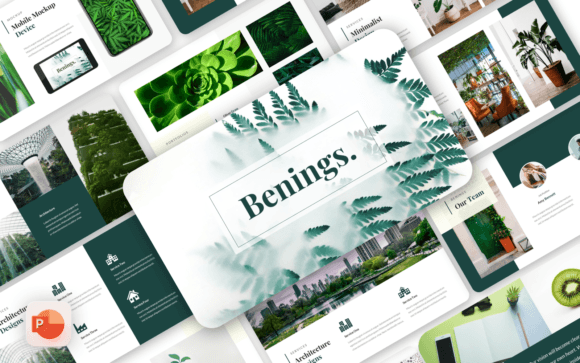
At its core, Benings is a premium presentation template built for professionals who value substance over ornamentation. With 40 thoughtfully designed slides, it offers a versatile foundation for everything from corporate reports to creative pitches. The visual personality is decidedly modern—crisp layouts, balanced whitespace, and a restrained color palette that you can easily adapt to your brand. It doesn’t scream for attention; instead, it guides the viewer’s eye naturally through your narrative.
Where This Template Truly Excels
Think about the projects where clarity and professionalism are non-negotiable. A company profile for investors needs to convey stability and vision without distracting flourishes. A pitch deck for a startup must balance innovation with credibility. Even a personal portfolio for a photographer or designer benefits from a layout that lets the work speak for itself. Benings adapts to these contexts seamlessly because its minimalist design acts as a neutral canvas.
I’ve seen entrepreneurs use it for corporate and business presentations where complex data needs to be presented in digestible chunks. The slide structures—with clear headings, ample room for charts, and consistent iconography—help maintain a logical flow. For creative agencies, the template’s clean aesthetic prevents the design from overshadowing the creative work being showcased. It’s a subtle but important distinction: the presentation supports the idea rather than competing with it.
The Practical Benefits of a Clean Design System
One of the biggest advantages of Benings is its Master Slides foundation. This isn’t just a technical detail—it’s a workflow game-changer. When you edit a master slide, those changes cascade throughout the entire presentation, ensuring visual consistency. You spend less time manually adjusting fonts or aligning elements and more time refining your message. For small business owners wearing multiple hats, this efficiency is invaluable.
The 16:9 widescreen ratio is standard for modern displays and projectors, but it’s worth noting how Benings uses that space. The layouts avoid the common pitfall of making slides feel either empty or overloaded. There’s a thoughtful balance between text, imagery, and breathing room. The picture placeholder feature is particularly useful—you can drag and drop your images into pre-defined areas, and they’ll automatically crop and fit without distorting your composition.
Typography That Works With You
While Benings is a presentation template rather than a standalone typeface, its approach to typography is worth discussing. It recommends free web fonts, which means you won’t face licensing headaches when sharing files or presenting on different computers. The font choices in the demo lean toward clean sans serif styles—perfect for maintaining readability on screen. If you’re pairing it with your own brand fonts, the neutral design makes integration straightforward.
Consider how this affects brand identity consistency. If your company uses a specific modern typography system, Benings provides a structured environment where those fonts can shine without competing with ornate slide designs. The template becomes a vehicle for your existing brand identity, not a distraction from it. This is particularly valuable for marketing teams maintaining brand guidelines across multiple presentations.
Practical Guidance for Implementation
Before diving into customization, take time to evaluate your project’s specific needs. If you’re preparing a corporate annual report, you might prioritize slides with data visualization. For a photography portfolio, the image-focused layouts will be more relevant. The template includes 40 slides, but you likely won’t use all of them—curate based on your content requirements.
When testing font pairings, remember that the template’s clean aesthetic pairs well with both geometric and humanist sans serifs. If you want to add contrast, consider using a serif font for headings while keeping body text in a sans serif. The key is maintaining hierarchy without creating visual tension. Since all graphics are resizable and editable, you can adjust spacing and sizing to accommodate different typographic choices.
Beyond the Business Context
While marketed as a business PowerPoint template, Benings has surprising versatility. I’ve seen educators use it for clean, focused lecture slides. Nonprofit organizations appreciate its ability to present data and stories without visual clutter. Even for personal use—like planning a wedding or organizing community events—the minimalist approach keeps information accessible.
The drag-and-drop functionality makes it approachable for those without extensive design experience. You don’t need to be a PowerPoint expert to create professional-looking slides. The documentation file provides guidance, but the intuitive layout means most users can start customizing immediately. This accessibility is crucial for small business owners and entrepreneurs who need to create polished presentations quickly.
In a world saturated with over-designed templates, Benings – Minimalist Business PowerPoint offers a refreshing alternative. It proves that professionalism doesn’t require complexity, and that sometimes the most powerful design choice is knowing what to leave out. Whether you’re presenting to stakeholders, clients, or collaborators, this template provides the structure to let your content—and your expertise—take center stage.