Crebelio: A Fresh Take on Creative Google Slides
When you're building a brand or pitching a new idea, the tools you choose say as much about you as the words you use. A clunky, outdated presentation can undermine even the most brilliant concept. That’s where a thoughtfully designed template like Crebelio – Creative Google Slides comes in. It’s not just a collection of slides; it’s a visual framework designed to help you communicate with clarity and style.
More Than Just Slides: Defining Crebelio's Visual Personality
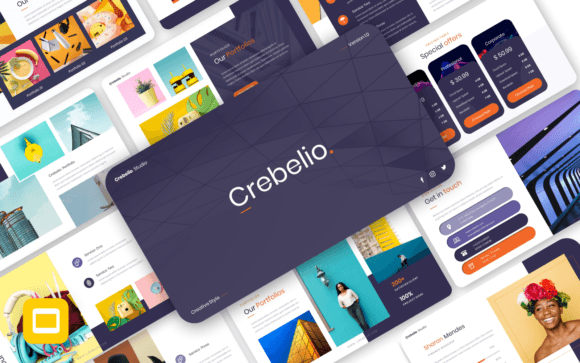
Crebelio presents itself as a modern, clean, and versatile presentation template. Its visual personality leans toward a professional yet approachable aesthetic. You won’t find overly complex animations or distracting gradients here. Instead, the focus is on strong typographic hierarchy, ample white space, and a balanced layout that guides the viewer’s eye naturally. The style feels contemporary—suitable for a tech startup’s pitch deck but equally at home in a creative agency’s portfolio review. It’s a template that respects your content, providing a polished stage rather than competing for attention.
The appeal lies in its adaptability. With 36 slides built on master slides, it offers a structured yet flexible canvas. The use of recommended free web fonts is a practical touch, eliminating the cost and hassle of licensing premium typefaces for your presentation. The 16:9 widescreen ratio is now standard, ensuring your slides look sharp on modern displays. Features like picture placeholders and a drag-and-drop interface are about efficiency—they let you focus on your message rather than fighting with formatting.
Where Crebelio Shines: Real-World Applications
The true test of any design asset is how it performs in the field. Crebelio – Creative Google Slides is built for a variety of purposes, making it a valuable tool for professionals across many disciplines.
For entrepreneurs and startups, a pitch deck needs to be compelling and credible. Crebelio’s clean layout helps present financials, roadmaps, and team profiles without visual clutter, allowing the business case to stand out. Its professionalism can subtly boost investor confidence.
Marketing and branding professionals will find it useful for internal presentations, campaign briefs, or client reports. The template’s consistent design language helps maintain brand integrity across documents. You can easily adapt the color palette to match a client’s brand identity, ensuring every touchpoint feels cohesive.
In the realm of editorial design and publishing, it works well for author presentations, magazine pitch decks, or portfolio showcases for photographers and designers. The picture placeholder feature is particularly handy here, allowing you to quickly insert your best work and let it speak for itself.
Even for personal projects—like a portfolio for a job application or a keynote for a community talk—Crebelio provides a professional polish that can make a significant difference in how your work is perceived.
Practical Guidance: Choosing and Using Crebelio
Before diving in, it’s wise to evaluate if this template fits your specific project. Ask yourself: Does the minimalist, modern style align with my brand’s personality? If your brand is more ornate or traditional, you might need a template with different visual cues. However, for most contemporary projects, Crebelio’s neutrality is an asset.
Once you’ve decided to use it, the process is straightforward. After downloading the Google Slides .PPTX file and reviewing the included documentation, start by customizing the master slides. This is the most efficient way to apply your brand’s colors and fonts globally. The template’s structure is based on these masters, so changes made here will cascade throughout your presentation, ensuring consistency and saving you time.
A key step is font pairing. While the template recommends free web fonts, you are not locked into them. You can replace them with your own brand fonts. A good rule of thumb is to maintain a clear hierarchy: use one typeface for headings and another for body text. For instance, you might pair a clean sans serif font for headlines with a highly readable serif or sans serif for body copy. Test the pairings on a few slides to ensure they work harmoniously at different sizes.
Remember, the images in the demo are for preview only. The real work involves inserting your own high-quality photography or graphics. Use the placeholders as guides for composition and aspect ratio. The template’s grid-based design will help you align elements neatly, but always trust your eye for the final balance.
Finally, think about readability and audience engagement. Crebelio’s design prioritizes clarity, which is your responsibility to uphold. Avoid cramming too much text onto a single slide. Use bullet points (like the ones in the features list) to break up information. Let the visual hierarchy established by the template guide your audience from key points to supporting details.
In the end, a tool like Crebelio – Creative Google Slides is about removing friction from the creative process. It provides a professional foundation so you can concentrate on what truly matters: your ideas, your story, and your connection with the audience. It’s a practical asset for anyone who needs to present their work with confidence and style.